
Receipt Template
Fake Donation Receipt Generator
Create a donation receipt with EIN, donor details, and the required no-goods-or-services statement. Built for nonprofits, done in about a minute.
Get Your Donation Receipt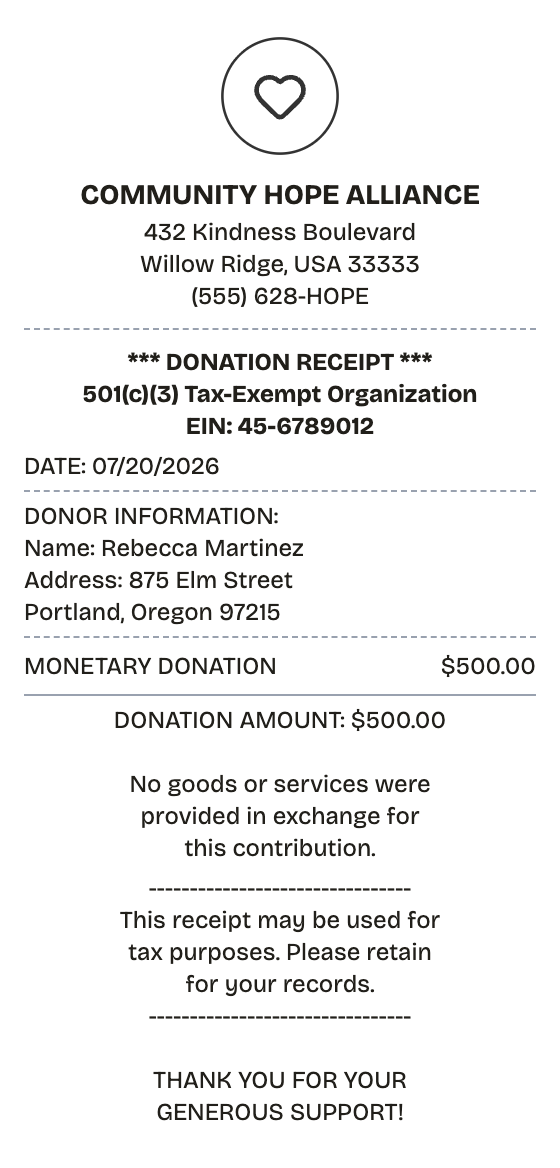
Features
A Donation Receipt With the Details Handled
Everything on the receipt is a field you can change, from the logo down to the barcode digits.
Drag & Drop Builder
Order donor details, contribution amount, and the tax statement the way an official acknowledgment reads.
Real-time Preview
Watch the receipt update as you enter the donor, the date, and the amount — errors surface before you export.
Multiple Export Formats
PDF suits tax files, PNG works for emailed acknowledgments, JPEG covers quick donor follow-ups.
Custom Styling
EIN, 501(c)(3) line, organization address — every field is editable so the acknowledgment holds up.
Barcode & QR Support
Drop in a QR code that points to your giving page, or a barcode for internal tracking.
Paper Styles
White paper for formal tax acknowledgments; thermal for on-the-spot event donations.
How it works
From Blank Page to Donation Receipt
The whole workflow, start to finish
- 01
Start here
- 02
Adjust what matters
- 03
Export it
Use cases
The Situations It Covers
Where this layout earns its keep
Nonprofit Acknowledgments
Send compliant receipts to every donor without a fundraising platform
Donor Tax Filing
Give donors the documentation the IRS asks for at deduction time
Fundraising Ledger
Keep a receipt trail behind every gift in your annual report
Grant Audits
Back up grant applications with organized contribution records
Year-End Giving Summaries
Produce the annual statements donors expect each January
Community Fundraisers
Cover school, church, and club drives with proper acknowledgments
FAQ
Good Questions, Short Answers
The fine print, minus the fine print
At what amount does the IRS require a donation receipt?
A written acknowledgment is mandatory for any single gift of $250 or more. Most nonprofits issue one for every donation regardless of size — it costs nothing and keeps donor records clean.
What makes a donation receipt IRS-compliant?
Four things: the organization's name and EIN, the donor's name, the date and amount of the gift, and an explicit statement on whether the donor received goods or services in return.
How do I document non-cash donations?
List and describe the donated items, but leave the valuation off. Federal rules put fair market value on the donor, not the charity.
What is a donation receipt?
A donation receipt is the written acknowledgment a nonprofit gives a donor to confirm a charitable contribution. The IRS requires one for any single gift of $250 or more; careful organizations issue them for every gift. The details must be right: the organization's legal name and EIN (Employer Identification Number), the donor's name, the date and amount, a statement on whether goods or services were exchanged, and a description of any non-cash items.
When would you need a donation receipt?
A donor's charitable deduction rests on this document — without a compliant receipt, the IRS can throw the deduction out in an audit. Nonprofits issue them to stay within IRS rules, keep donor trust, and feed clean numbers into year-end summaries, grant reports, and fundraising records.
Which fields matter most on a donation receipt?
Legal name and address of the nonprofit • EIN (Employer Identification Number) • Donor's name and address • Contribution date and amount • Whether goods or services were provided in exchange • Description of any non-cash gifts • Tax-deductibility language
How to make your donation receipt look right
Print the EIN on every receipt -- donors can't file the deduction without it • Use the exact IRS wording: "No goods or services were provided in exchange for this contribution" • Remind donors to keep the receipt with their tax records • Describe non-cash gifts without pricing them -- assigning fair market value is the donor's job, not the charity's
Is ReceiptPronto free to use?
Yes. You can build and customize receipts for free with no sign-up required. Watermark-free exports and saved receipts are available with Pro.
Is it legal to make a fake receipt?
Yes, when "fake" means a mockup: recreating your own lost purchase records, building props for film or design work, or generating test data. Using a generated receipt to deceive a business, employer, or agency is fraud and is prohibited under our Acceptable Use Policy.
Related
Keep Browsing
Cash Receipt
Signed cash payment receipt for payer and payee
Expense Receipt
Expense receipt with employee, category, and approval fields
PayPal Receipt
PayPal-style payment confirmation with a 17-character transaction ID, sender and recipient, fee line, and funding source.
Itemized Receipt
Line-by-line receipt with quantities, prices, and tax

Convenience Store Receipt
Corner store receipt with itemized purchases, tax, and barcode