
Receipt Template
Fake Expense Receipt Generator
Build an expense receipt with employee details, category, purpose, and an approval signature block. Totals calculate live. Export as PNG, PDF, or JPEG.
Get Your Expense Receipt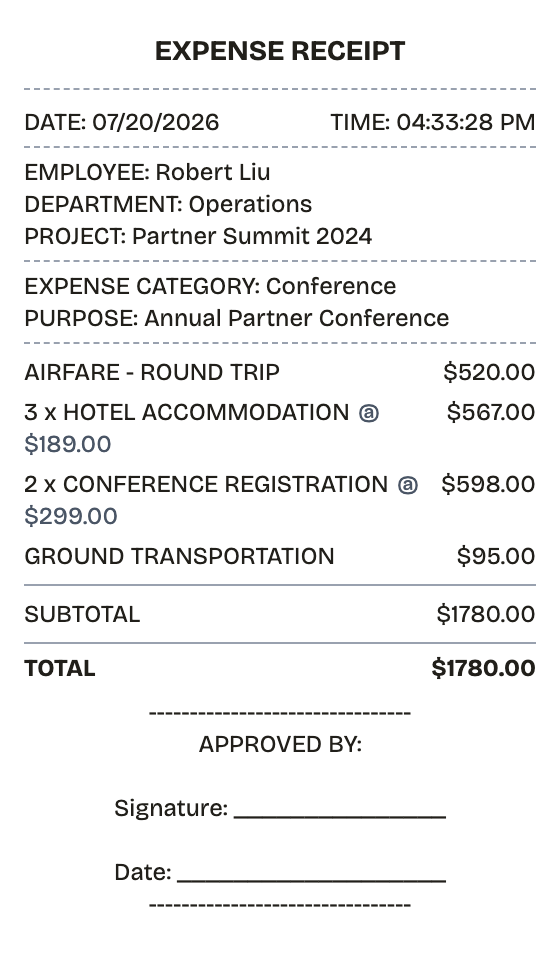
Features
Why This Expense Receipt Reads as Real
Everything on the receipt is a field you can change, from the logo down to the barcode digits.
Employee and Category Blocks
Reorder employee info, expense category, line items, and the approval block until the layout matches your reimbursement form.
Live Totals
Every cost you enter lands on the receipt instantly, and the total recalculates as line items change.
Three Export Formats
Export a PDF to attach to an expense report, or a PNG or JPEG when finance wants an image.
Everything Editable
Employee, department, project, and purpose lines are all plain text — rewrite them to fit corporate policy.
Barcode & QR Support
Drop in a Code128 barcode or QR code if your expense system scans submissions.
Paper Styles
White paper reads like formal documentation; thermal looks like the receipt that came with the purchase.
How it works
From Blank Page to Expense Receipt
The whole workflow, start to finish
- 01
Start here
- 02
Adjust what matters
- 03
Export it
Use cases
The Situations It Covers
Where this layout earns its keep
Expense Reports
Document business expenses for company reimbursement
Tax Documentation
Keep organized records for tax filing and deductions
Client Invoicing
Create professional receipts for client billing
Proof of Purchase
Generate records for warranties and returns
Budget Tracking
Monitor spending with organized receipt records
Reimbursements
Submit clear expense documentation for refunds
FAQ
Good Questions, Short Answers
The fine print, minus the fine print
Is ReceiptPronto free to use?
Yes. You can build and customize receipts for free with no sign-up required. Watermark-free exports and saved receipts are available with Pro.
Is it legal to make a fake receipt?
Yes, when "fake" means a mockup: recreating your own lost purchase records, building props for film or design work, or generating test data. Using a generated receipt to deceive a business, employer, or agency is fraud and is prohibited under our Acceptable Use Policy.
Related
Keep Browsing
Cash Receipt
Signed cash payment receipt for payer and payee
Sales Receipt
Itemized retail sales receipt with tax and card payment
Itemized Receipt
Line-by-line receipt with quantities, prices, and tax
PayPal Receipt
PayPal-style payment confirmation with a 17-character transaction ID, sender and recipient, fee line, and funding source.

Convenience Store Receipt
Corner store receipt with itemized purchases, tax, and barcode