
Receipt Template
Fake Gas Station Receipt Generator
Make a gas station receipt with fuel grade, gallons, price per gallon, and pump number. Thermal-style output with a transaction barcode, done in about a minute.
Open the Gas Station Receipt Builder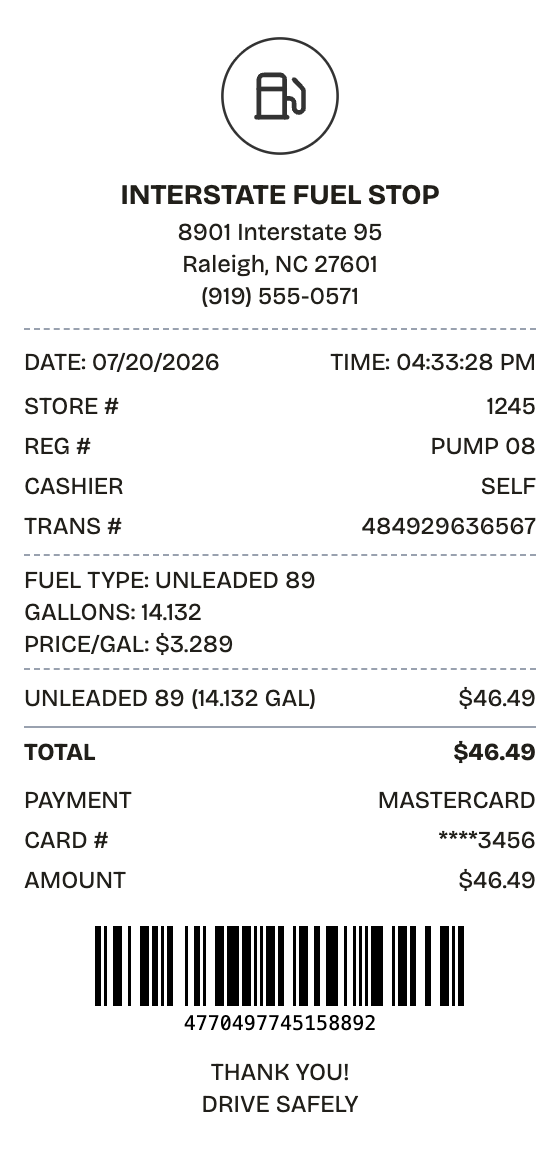
Features
The Gas Station Receipt, Minus the Fiddly Parts
Real widths, real fonts, real spacing — the export holds up next to the original.
Pump-Style Layout
Fuel grade, gallons, price per gallon, and pump number arranged the way pump printers arrange them.
Live Totals
Change the gallons or the price and the total updates on the spot.
PDF, PNG, and JPEG Export
PDF for mileage logs and audits, PNG or JPEG for a quick expense upload.
Station Details
Station name, store number, pump number, fuel grade — every field on the receipt is editable.
Transaction Barcode
A Code128 barcode ships on the template by default, matching what stations print for loyalty and verification.
Thermal Output
Thermal styling reproduces the look of an actual pump receipt; white is there when you want clean.
How it works
The Fast Route to a Gas Station Receipt
No account, no install, no learning curve
- 01
Open this layout
- 02
Type over the details
- 03
Take the file
Use cases
Jobs This Template Does
The scenarios this format handles best
Mileage Claims
Back business mileage reimbursements with fuel purchase records
Fleet Fuel Logs
Follow per-vehicle fuel spend across a company fleet
Vehicle Deductions
Keep the receipts that self-employed vehicle deductions depend on
Gig Drivers
Document fuel costs for rideshare and delivery tax filings
MPG Tracking
Log gallons against odometer readings to watch fuel economy
Card Reconciliation
Tie pump receipts to corporate card statement lines
FAQ
Before You Ask
The short version of everything gas station receipt related
How do I show gallons and fuel grade?
List the grade, gallons, and per-gallon price in a custom message section, then carry the fuel total as a single line item below it — the layout this template uses.
Why is there no sales tax line?
Federal and state fuel taxes sit inside the advertised per-gallon price, so pump receipts show 0% added tax. The template defaults to exactly that.
Can I add a pump number?
Yes. The transaction info section holds the pump number, store number, and a transaction reference — the same fields a real station prints.
What is a gas station receipt?
A gas station receipt records a fuel purchase at the pump or register: station name and address, pump number, fuel grade, gallons dispensed, price per gallon, total, and payment method — usually stamped with a date, time, and transaction barcode. It is the standard proof of a gasoline or diesel purchase.
When would you need a gas station receipt?
Fuel receipts carry mileage reimbursements, fleet fuel accounting, and vehicle expense deductions for the self-employed. Rideshare and delivery drivers need them at tax time, fleets need them per vehicle, and if the IRS ever questions business mileage, the receipts are the paper trail.
What information goes on a gas station receipt?
Station name and address • Pump number plus fuel grade • Gallons dispensed and price per gallon • Fuel total • Date, time, transaction number • Payment method and card digits
Getting the details right on your gas station receipt
Put grade, gallons, and price per gallon in a custom message block, the way pumps print them above the total • Show the pump number in the transaction info section — real pump receipts always carry it • Keep tax at 0%; fuel taxes are baked into the posted per-gallon price • Include a store number when the receipt feeds fleet or corporate tracking
Is ReceiptPronto free to use?
Yes. You can build and customize receipts for free with no sign-up required. Watermark-free exports and saved receipts are available with Pro.
Is it legal to make a fake receipt?
Yes, when "fake" means a mockup: recreating your own lost purchase records, building props for film or design work, or generating test data. Using a generated receipt to deceive a business, employer, or agency is fraud and is prohibited under our Acceptable Use Policy.
Related
Other Receipts Worth a Look
Auto Service Receipt
Mechanic-style receipt covering services, parts, labor, and vehicle details
Oil Change Receipt
Quick-lube receipt with oil type, mileage, and next-service reminder

Convenience Store Receipt
Corner store receipt with itemized purchases, tax, and barcode

Pharmacy Receipt
Prescription receipt with Rx numbers, copay, and insurance lines

Restaurant Receipt
Dinner check with menu items, tax, tip guide, and signature line