
Receipt Template
Fake Cash Receipt Generator
Make a cash receipt with payer, amount, purpose, and signature lines in about a minute. Every field is editable and exports clean to PNG, PDF, or JPEG.
Edit This Cash Receipt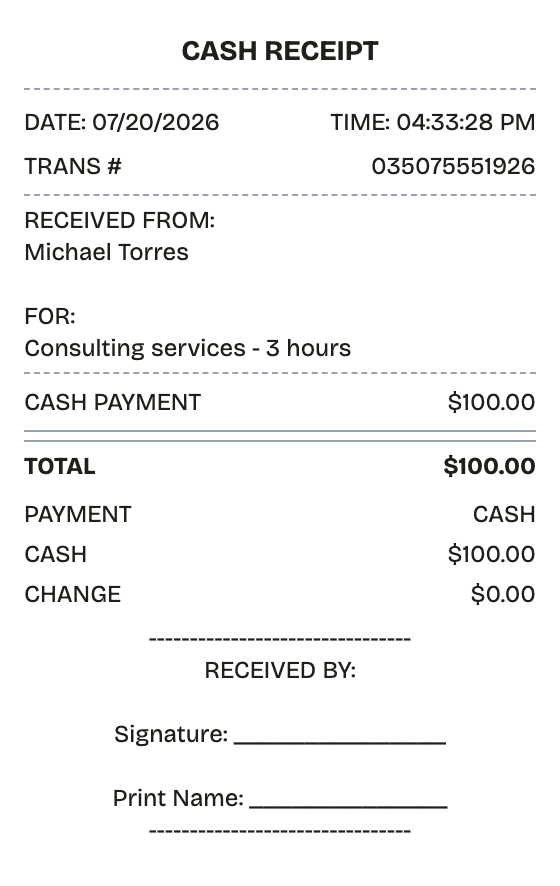
Features
What This Cash Receipt Template Gets Right
Real widths, real fonts, real spacing — the export holds up next to the original.
Drag & Drop Builder
Stack the payer line, amount, purpose, and signature block in whatever order the transaction calls for.
Real-time Preview
Each edit — amount, date, transaction number — lands on the receipt the moment you type it.
Multiple Export Formats
PDF for the ledger, PNG for a records folder, JPEG to send the payer their copy.
Custom Styling
Name the receiver, state what the cash covered, and keep the layout as plain or formal as needed.
Barcode & QR Support
Attach a barcode or QR code if you tie cash receipts to a numbering or tracking system.
Paper Styles
White paper for signed business records; thermal when it should look like it came off a register.
How it works
Building a Cash Receipt Takes About a Minute
Most people finish their first receipt inside two minutes
- 01
Load the format
- 02
Swap in your purchase
- 03
Download and done
Use cases
Who Reaches for a Cash Receipt
From lost paperwork to prop-making, the usual suspects
Any Cash Transaction
Put a written record behind money that changed hands in person
Cash Rent
Give tenants dated proof when rent is not paid through a bank
Contractor and Sitter Pay
Document cash paid to tradespeople, babysitters, and tutors
Register Sales
Record over-the-counter sales when there is no electronic POS
Books and Taxes
Keep cash income documented for accounting and filing
Loan Repayments
Track cash installments on loans between individuals
FAQ
The Cash Receipt, Answered
Answers to the questions that come up most
Why bother with a receipt for a cash payment?
Because cash is the one payment method that documents nothing on its own. The receipt records who paid, how much, and why — and it is what bookkeeping and tax filings will lean on later.
Does a cash receipt hold up legally?
It is evidence of payment, not a contract. A receipt signed by both parties is hard to argue against in a payment dispute, so for anything that matters, get both signatures.
What goes on a cash receipt?
Date, both names, the amount, the purpose, and signatures. Businesses should add a receipt number and their own details on top.
What exactly is a cash receipt?
A cash receipt documents that cash changed hands. Card payments generate their own records; cash does not, so the receipt is the record. Done properly it names the date, the payer, the payee, the amount, and what the payment covered, and it carries signatures from both sides. It is the standard instrument for person-to-person payments, small businesses running without a POS, and informal service work.
When would you need a cash receipt?
Cash leaves no trail unless you make one. The receipt is proof of payment for the payer and proof of income for the receiver — and the document each side reaches for when memories differ. Businesses lean on them for bookkeeping and taxes, landlords for cash rent, and individuals for private sales, service payments, and loan repayments.
What information goes on a cash receipt?
Payment date • Payer (who handed over the cash) and payee (who took it) • Amount in figures, written out as well for larger sums • What the payment covered • Method noted as cash • Signature lines for both sides
How to make your cash receipt look right
Get both signatures -- an unsigned cash receipt settles nothing • Spell out exactly what the payment covered; vague purposes invite disputes • Leave tax at 0% unless the underlying goods or services are taxable • Make two copies, one per party, and note on the receipt that each should keep theirs
Is ReceiptPronto free to use?
Yes. You can build and customize receipts for free with no sign-up required. Watermark-free exports and saved receipts are available with Pro.
Is it legal to make a fake receipt?
Yes, when "fake" means a mockup: recreating your own lost purchase records, building props for film or design work, or generating test data. Using a generated receipt to deceive a business, employer, or agency is fraud and is prohibited under our Acceptable Use Policy.
Related
If This Is Close but Not Quite
Sales Receipt
Itemized retail sales receipt with tax and card payment
Expense Receipt
Expense receipt with employee, category, and approval fields

Cash App Receipt
Cash App-style payment confirmation with $cashtags for both sides, a payment note, status line, and funding source.
PayPal Receipt
PayPal-style payment confirmation with a 17-character transaction ID, sender and recipient, fee line, and funding source.

Convenience Store Receipt
Corner store receipt with itemized purchases, tax, and barcode