
Receipt Template
Fake Target Receipt Generator
Make a Target-style receipt with DPCI item codes, split tax rates, Circle savings, and a receipt barcode. Totals update live; export PNG, JPG, or PDF fast.
Edit This Target Receipt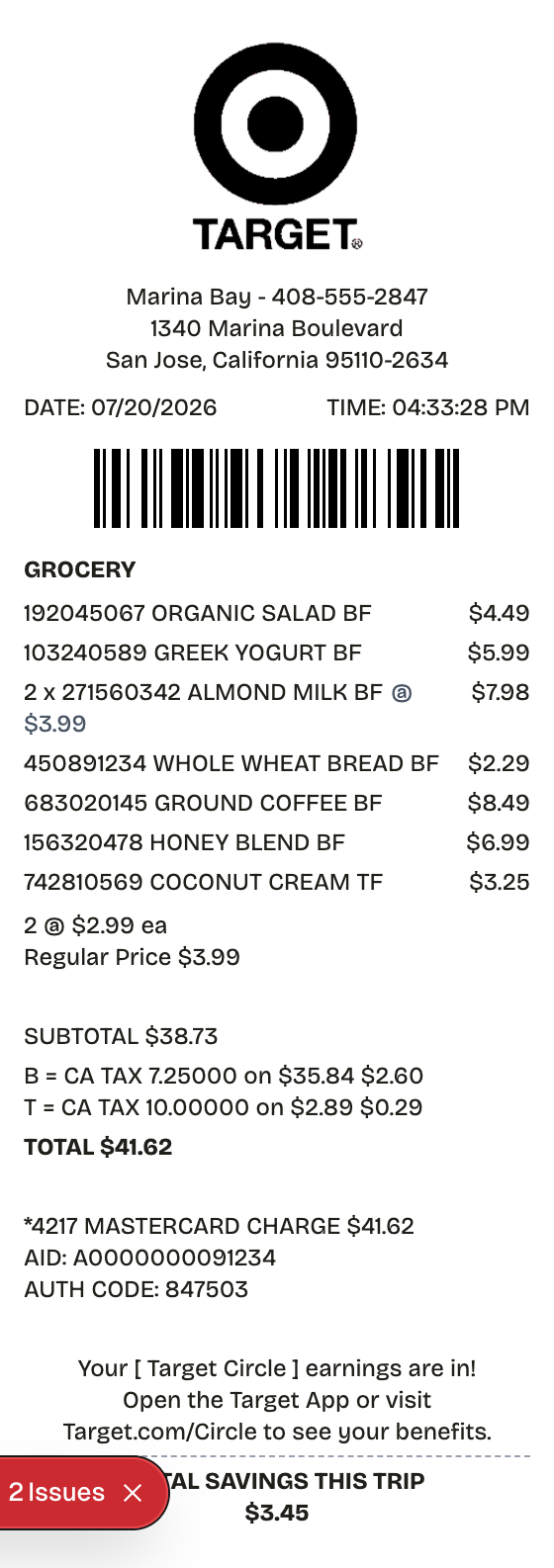
Features
One Minute From Blank to Target Receipt
Everything on the receipt is a field you can change, from the logo down to the barcode digits.
Flexible Section Order
Stack the receipt the way Target prints it - barcode up top, category headers, items, split taxes, savings footer - then reorder anything.
Instant Preview
Every price, DPCI, and savings line you type lands on the receipt immediately.
Three Export Formats
Pull the finished receipt as PNG, PDF, or JPEG depending on where it is headed.
Editable Everything
Store address, card details, the Circle blurb, tax rates - change any of it, or swap in a different logo.
Barcodes Built In
A Code128 receipt barcode sits under the date line, and QR codes drop in anywhere.
Thermal or Plain Paper
Thermal texture for register realism, plain white when legibility wins.
How it works
Building a Target Receipt Takes About a Minute
Most people finish their first receipt inside two minutes
- 01
Load the format
- 02
Swap in your purchase
- 03
Download and done
Anatomy
What Belongs on a Target Receipt
A quick tour of the real thing before you build yours.
- Store header
- The bullseye logo with the store name, street address, and phone.
- Item lines
- One row per product: an abbreviated name, the DPCI (Target's own 3-2-4 digit department-class-item number), the price, and a tax-status letter.
- Totals block
- Subtotal, one tax line per rate, and the total - with the 5% RedCard discount shown when it applies.
- Payment details
- The tender and card last four, with separate lines for RedCard, Circle offers, and gift card redemptions.
- Return window note
- Printed return-by dates for many items; RedCard holders get an extra 30 days on theirs.
- Receipt ID barcode
- The bottom barcode encoding the receipt ID - the scan target for returns and exchanges.
Use cases
Who Reaches for a Target Receipt
From lost paperwork to prop-making, the usual suspects
Lost Receipt Replacement
Rebuild the record of your own Target purchase when the slip is gone
Expense Documentation
Attach itemized proof to reimbursement claims
Return Backup
Keep the receipt ID on file against return windows
Household Budgeting
Turn Target runs into line-item spending data
Tax Filing Records
Hold itemized purchase evidence for deduction season
Prop & Mockup Work
Stage a convincing retail slip for design projects
FAQ
The Target Receipt, Answered
Answers to the questions that come up most
What does DPCI mean on a Target receipt?
Department-class-item: Target's in-house product number, always 3-2-4 digits. It prints beside every item on the slip, next to the price.
What information does a Target receipt carry?
Store details, the date and register, items with DPCIs and prices, tax letters, split tax lines, the tender with any RedCard savings, and the receipt-ID barcode. Every one of those fields is editable here.
Will Target retrieve a receipt I lost?
Usually yes for card payments - stores can search the purchase from the card. Cash leaves no trail, so the printed slip is the only record, and the reason to keep or rebuild your own copy.
What is a target receipt?
The slip a Target register produces at checkout. Its signature detail is the DPCI - Target's internal 3-2-4 digit item number printed beside every product - alongside tax-status letters, split tax lines, the payment block, Circle or RedCard savings, and a receipt-ID barcode the store scans at returns.
Why would you recreate a target receipt?
Target's return windows vary by item and payment method, so the receipt is what settles a return or price-match. Card purchases can usually be looked up in-store; cash purchases cannot, which makes the paper slip the only record. It also documents spending for expense reports and shows exactly what Circle or RedCard saved you.
Which fields matter most on a target receipt?
Store name, street address, and phone • Date and time with the register and cashier • Item lines carrying the 3-2-4 digit DPCI and price • Tax-status letters beside each price • Subtotal, tax split by rate, and total • Tender, card last four, and any RedCard 5% line • The receipt-ID barcode scanned at the returns desk
Tips for creating your target receipt
Format DPCIs as 3-2-4 digits, like 062-07-1234 - that pattern is what says Target • A RedCard payment gets its own 5% discount line • Tax letters and the tax lines have to agree, or the math reads wrong • The bottom barcode carries the receipt ID - it is the piece Target actually scans
Is ReceiptPronto free to use?
Yes. You can build and customize receipts for free with no sign-up required. Watermark-free exports and saved receipts are available with Pro.
Is it legal to make a fake receipt?
Yes, when "fake" means a mockup: recreating your own lost purchase records, building props for film or design work, or generating test data. Using a generated receipt to deceive a business, employer, or agency is fraud and is prohibited under our Acceptable Use Policy.
Related
If This Is Close but Not Quite

Walmart Receipt
Walmart-style register receipt with transaction codes, an EFT debit block, and dual barcodes. Every line is editable, including your own logo.

Costco Receipt
Costco-style warehouse slip with a member number, coded item lines, and a full card-authorization block. Everything on it is editable.

Grocery Receipt
Supermarket register tape with items, savings, and loyalty points

Convenience Store Receipt
Corner store receipt with itemized purchases, tax, and barcode

Uber Receipt
Uber-style ride receipt with fare breakdown, surcharges, payment card details, driver name, and pickup-to-dropoff route.