
Receipt Template
Fake Grocery Receipt Generator
Create a grocery receipt with itemized products, coupon savings, and loyalty points in about a minute. Totals calculate live; export as PNG, PDF, or JPEG.
Edit This Grocery Receipt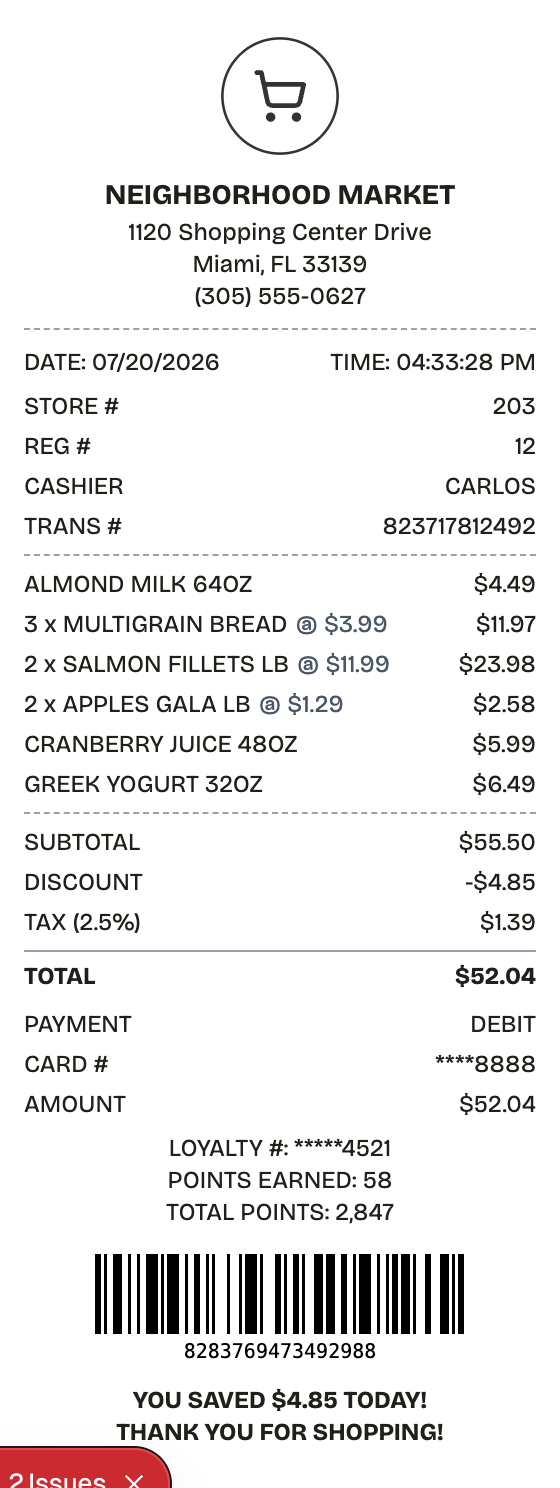
Features
A Grocery Receipt With the Details Handled
Open the layout, type your details, and the grocery receipt comes out looking printed, not typed.
Drag & Drop Builder
Stack the sections like a register tape — items, savings, loyalty points, barcode — and drag each into place.
Real-time Preview
Add products or change a discount and the tape redraws instantly, savings line included.
Multiple Export Formats
PDF for the budget folder, PNG or JPEG when you just need an image of the tape.
Custom Styling
Set the store name, cashier, and register number so it prints like your local supermarket's tape.
Barcode & QR Support
Finish the tape with a Code128 barcode or a QR code, auto-generated or set by hand.
Paper Styles
Thermal paper gives the true register-tape look; white keeps it clean for filing.
How it works
Building a Grocery Receipt Takes About a Minute
Most people finish their first receipt inside two minutes
- 01
Load the format
- 02
Swap in your purchase
- 03
Download and done
Use cases
Who Reaches for a Grocery Receipt
From lost paperwork to prop-making, the usual suspects
Budget Tracking
See exactly where the weekly food money went
Price Verification
Hold documented prices for price-match and sale-price disputes
Returns & Exchanges
Keep proof of purchase for items going back to the store
Business Food Expenses
Expense office kitchen runs with an itemized record
Meal Planning Records
Cost out ingredients for meal prep budgets
Store Operations
Issue receipts while the register tape or POS is out of action
FAQ
The Grocery Receipt, Answered
Answers to the questions that come up most
Are groceries taxed on the receipt?
Unprepared food is exempt from sales tax in most US states; tax normally applies only to non-food items like cleaning supplies and paper goods. Set whatever rate matches your state — the template accepts any value.
How do I show loyalty savings on the receipt?
Enter the savings amount in the totals section's discount field, then edit the loyalty block for the card number, points earned, and running balance.
Can I make long receipts with many items?
Add as many lines as the trip needs — the preview and every export format extend to fit, the way a real register tape just keeps printing.
What exactly is a grocery receipt?
A grocery receipt is the register tape a supermarket prints for a cart of food: every product with quantity and price, coupon and loyalty savings, tax on the non-food items, the total, and the payment. Most chains add a loyalty number, points earned, and a "you saved" line at the bottom.
Why would you recreate a grocery receipt?
A grocery receipt has more moving parts than most — savings lines, mixed tax treatment, loyalty points — and the numbers have to reconcile, because a savings total that doesn't match the discounts is obvious at a glance. Get it right and it covers budget tracking, returns, price-match claims, and food purchases expensed to a business.
What are the key fields on a grocery receipt?
Store name, store number, register, and cashier • Every product with quantity and unit price • Coupon, sale, and loyalty savings • Tax status per item — food exempt, non-food taxed • Subtotal, tax, and total • Payment method, loyalty number, and points earned
Tips for creating your grocery receipt
Put coupon and loyalty savings in the discount field so the total accounts for them automatically • Make the "you saved" footer match the discount amount exactly — this template ships with both at $4.85 • Most states exempt unprepared food, so keep the tax rate low and apply it only to non-food items • Long tapes read as real: a grocery run is rarely under a handful of items
Is ReceiptPronto free to use?
Yes. You can build and customize receipts for free with no sign-up required. Watermark-free exports and saved receipts are available with Pro.
Is it legal to make a fake receipt?
Yes, when "fake" means a mockup: recreating your own lost purchase records, building props for film or design work, or generating test data. Using a generated receipt to deceive a business, employer, or agency is fraud and is prohibited under our Acceptable Use Policy.
Related
If This Is Close but Not Quite
Costco Receipt
Costco-style warehouse slip with a member number, coded item lines, and a full card-authorization block. Everything on it is editable.

Convenience Store Receipt
Corner store receipt with itemized purchases, tax, and barcode

Pharmacy Receipt
Prescription receipt with Rx numbers, copay, and insurance lines
Auto Service Receipt
Mechanic-style receipt covering services, parts, labor, and vehicle details

Restaurant Receipt
Dinner check with menu items, tax, tip guide, and signature line