
Receipt Template
Fake PayPal Receipt Generator
Make a PayPal receipt with a transaction ID, sender and recipient details, fee breakdown, and funding source. Every field edits live; export PNG, JPG, or PDF.
Edit This PayPal Receipt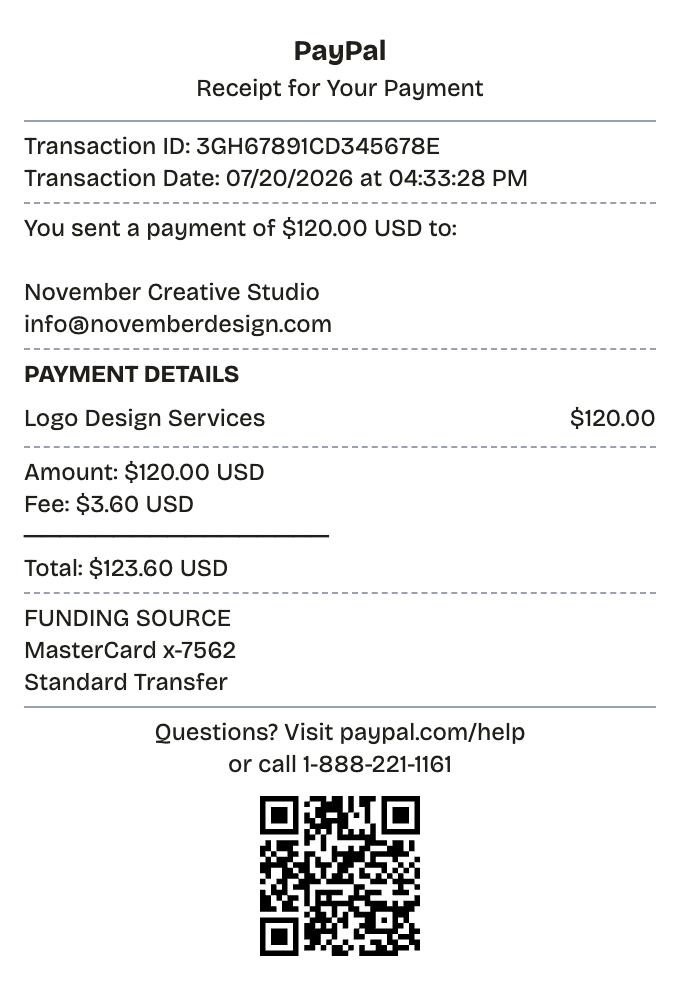
Features
One Minute From Blank to PayPal Receipt
Everything on the receipt is a field you can change, from the logo down to the barcode digits.
Transaction ID and Date
Set the 17-character ID and timestamp that anchor a real PayPal record.
Both Parties
Name and email for sender and recipient, matching how PayPal ties accounts to email.
Fee Line
Amount, fee, and total each shown separately, the way goods-and-services payments report it.
Funding Source
State whether the money came from a card, a bank account, or the PayPal balance.
Familiar Layout
The structure follows PayPal's emailed confirmation, so the result reads as a payment record.
Three Export Formats
PNG for anywhere a screenshot goes, JPG for smaller files, PDF for filing.
How it works
Building a PayPal Receipt Takes About a Minute
Most people finish their first receipt inside two minutes
- 01
Load the format
- 02
Swap in your purchase
- 03
Download and done
Anatomy
What Belongs on a PayPal Receipt
A quick tour of the real thing before you build yours.
- Header
- PayPal's mark plus a one-line status such as "Receipt for your payment." It establishes what kind of record this is.
- Transaction ID
- Seventeen letters and digits, unique per payment. Every support ticket, refund, and dispute starts by quoting it.
- Amount and date
- How much moved, in what currency, and exactly when the transfer completed.
- Sender and recipient
- Both parties by name and email — email is the account identifier on PayPal.
- Funding source
- The balance, debit or credit card, or linked bank the payment drew from.
- Description and fees
- The payment's purpose, the fee PayPal kept on seller-side transactions, and the total after it.
Use cases
Who Reaches for a PayPal Receipt
From lost paperwork to prop-making, the usual suspects
Payment Evidence
Show a specific payment went through, with the ID to prove it
Client Records
Hand clients a clean record when an invoice is settled via PayPal
Spending Logs
Keep PayPal purchases documented for budgets
Dispute Prep
Hold the details you will need if a refund or dispute opens
Reconciliation
Match PayPal activity to your books at tax time
UI and Design Mockups
Produce convincing payment receipt mockups for design work
FAQ
The PayPal Receipt, Answered
Answers to the questions that come up most
How is a PayPal transaction ID formatted?
Seventeen characters mixing capitals and digits, unique to each payment. PayPal uses it to retrieve a transaction, so treat it as the receipt's most load-bearing field.
What does a PayPal receipt include?
Transaction ID, timestamp, amount and currency, both parties with emails, funding source, a payment description, the fee if any, and the total. All of it is editable here.
Which export format should I use?
PDF when the receipt goes into records or gets attached to an invoice; PNG when it needs to drop in wherever a screenshot would.
Does a PayPal receipt count as proof of payment?
Yes — for purchases, freelance work, and expense claims it is standard evidence. Recreate your own real payments or build mockups; never present a payment that did not occur.
What does a paypal receipt show?
A PayPal receipt is the record PayPal generates when money moves — an email confirmation plus an entry in account activity, never paper. It carries a transaction ID, the timestamp, the amount and currency, both parties with their emails, the funding source, and the fee if one applied.
When would you need a paypal receipt?
When a payment gets questioned — a refund, a chargeback, a client claiming an invoice went unpaid — the PayPal receipt is what settles it. The transaction ID pins down the exact payment, and accountants want the same records at tax time. Details must be right, because everyone checks the receipt against PayPal's own log.
Which fields matter most on a paypal receipt?
The 17-character transaction ID • Timestamp of the payment • Amount with its currency code • Sender's name and email address • Recipient's name and email address • Funding source: balance, card, or bank • What the payment covered • Fee taken and the resulting total
Tips for creating your paypal receipt
Format the transaction ID as 17 mixed letters and numbers — something like 8AB34567CD890123F • Skip the fee line on friends-and-family payments; include it on goods-and-services, where the seller pays it • Pick a side before you build: the sender's receipt and the recipient's receipt frame the payment differently • PayPal writes currency after the amount — $120.00 USD, not USD $120.00
Is ReceiptPronto free to use?
Yes. You can build and customize receipts for free with no sign-up required. Watermark-free exports and saved receipts are available with Pro.
Is it legal to make a fake receipt?
Yes, when "fake" means a mockup: recreating your own lost purchase records, building props for film or design work, or generating test data. Using a generated receipt to deceive a business, employer, or agency is fraud and is prohibited under our Acceptable Use Policy.
Related
If This Is Close but Not Quite

Cash App Receipt
Cash App-style payment confirmation with $cashtags for both sides, a payment note, status line, and funding source.
Cash Receipt
Signed cash payment receipt for payer and payee

Convenience Store Receipt
Corner store receipt with itemized purchases, tax, and barcode

Pharmacy Receipt
Prescription receipt with Rx numbers, copay, and insurance lines
Auto Service Receipt
Mechanic-style receipt covering services, parts, labor, and vehicle details