
Receipt Template
Fake Convenience Store Receipt Generator
Build a convenience store receipt in about a minute. Edit items, tax, and barcode on a realistic thermal layout, then export as PNG, PDF, or JPEG.
Edit This Convenience Store Receipt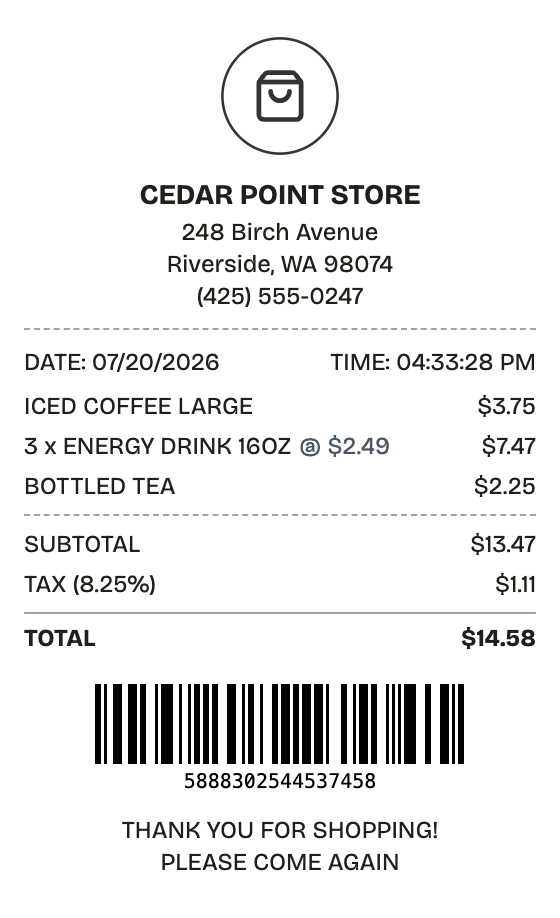
Features
What This Convenience Store Receipt Template Gets Right
Everything on the receipt is a field you can change, from the logo down to the barcode digits.
Drag & Drop Builder
Reorder any section — items, totals, barcode, store header — by dragging it where a real register would print it.
Real-time Preview
Every price change, added item, or layout tweak shows in the preview immediately. What you see is the exact export.
Multiple Export Formats
Export the finished receipt as PNG, PDF, or JPEG. Same layout, same detail, whichever format the job calls for.
Custom Styling
Set the store name, address, and fonts until the output matches the corner store you have in mind.
Barcode & QR Support
Drop in a Code128 barcode or a QR code. Values can auto-generate or be set by hand.
Paper Styles
Thermal paper reproduces the register-tape look. White paper works when you want a cleaner document.
How it works
Building a Convenience Store Receipt Takes About a Minute
Most people finish their first receipt inside two minutes
- 01
Load the format
- 02
Swap in your purchase
- 03
Download and done
Use cases
Who Reaches for a Convenience Store Receipt
From lost paperwork to prop-making, the usual suspects
Replace Lost Receipts
Rebuild a corner store receipt when the original never made it home
Expense Tracking
Attach clean documentation for small cash purchases to expense reports
Tax Records
Keep itemized proof of deductible purchases on file
POS Replacement
Hand customers a receipt while the register or printer is down
Design Mockups
Drop a realistic receipt into app screens or product shots
Training Materials
Give trainee cashiers and accounting students receipts to practice on
FAQ
The Convenience Store Receipt, Answered
Answers to the questions that come up most
What information is on a convenience store receipt?
Store name and address, date and time, each item with its price, subtotal, sales tax, total, payment method, and usually a barcode or transaction number at the bottom.
Can I customize the items on the receipt?
Every line is editable — descriptions, quantities, unit prices. The subtotal, tax, and total recalculate on their own as you type.
What paper style looks most realistic?
Thermal, paired with the receipt font. Registers print on thermal tape, so that combination is what people expect a corner store receipt to look like.
What is a convenience store receipt?
A convenience store receipt records a small retail sale at a corner store, bodega, or mini-mart: each item with its price, the subtotal, sales tax, and the amount paid. Store name and address, purchase date and time, and a barcode or transaction number round it out — the details a register prints on every sale.
Why would you recreate a convenience store receipt?
Receipts are unforgiving — a missing item line or a tax figure that doesn't match the total gives a record away instantly. A clean convenience store receipt covers expense reports, proof of purchase for returns, and bookkeeping. Store owners also reach for a template like this when a register printer dies mid-shift.
Which fields matter most on a convenience store receipt?
Store name, street address, and phone number • Purchase date and time • Each item with quantity and unit price • Subtotal, tax rate, and final total • How the customer paid — cash, or card with last four digits • A barcode or transaction number the store can look up
How to make your convenience store receipt look right
Pick the thermal paper style — real convenience stores almost never print on white • Leave the barcode on; a register receipt without one looks incomplete • Match the tax rate to the store's actual jurisdiction — this template defaults to 8.25% • Keep item names short and uppercase, the way register software abbreviates them
Is ReceiptPronto free to use?
Yes. You can build and customize receipts for free with no sign-up required. Watermark-free exports and saved receipts are available with Pro.
Is it legal to make a fake receipt?
Yes, when "fake" means a mockup: recreating your own lost purchase records, building props for film or design work, or generating test data. Using a generated receipt to deceive a business, employer, or agency is fraud and is prohibited under our Acceptable Use Policy.
Related
If This Is Close but Not Quite

Grocery Receipt
Supermarket register tape with items, savings, and loyalty points

Walmart Receipt
Walmart-style register receipt with transaction codes, an EFT debit block, and dual barcodes. Every line is editable, including your own logo.

Target Receipt
Target-style register receipt with DPCI item codes, split tax rates, and a Circle savings footer. Every line is editable, logo included.
Cash Receipt
Signed cash payment receipt for payer and payee

Pharmacy Receipt
Prescription receipt with Rx numbers, copay, and insurance lines