
Receipt Template
Fake Restaurant Receipt Generator
Build a restaurant receipt with menu items, tax, tip guide, and server details in about a minute. Every line is editable and totals update as you type.
Build This Restaurant Receipt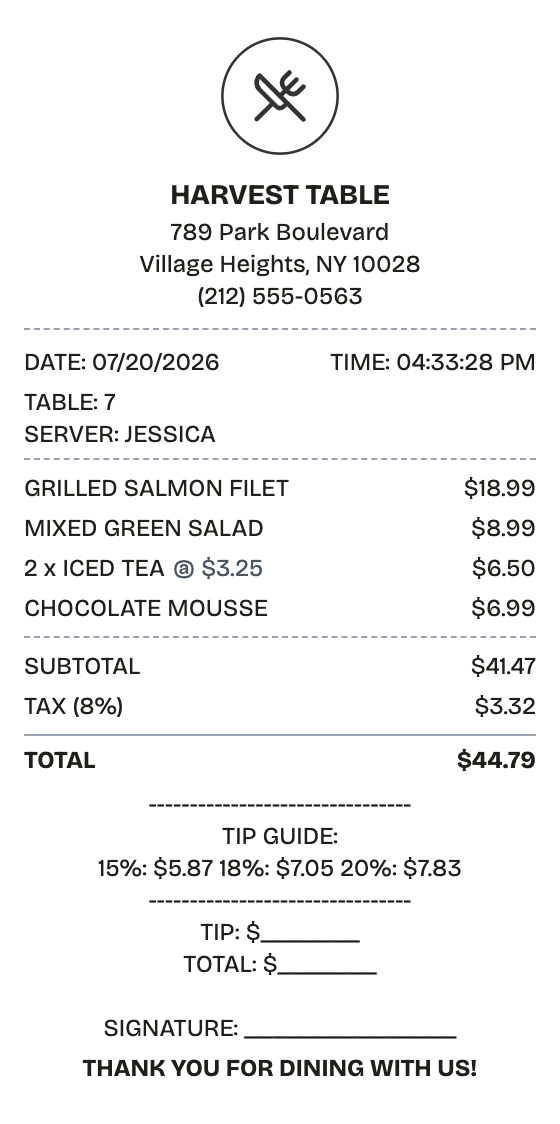
Features
The Restaurant Receipt, Minus the Fiddly Parts
Open the layout, type your details, and the restaurant receipt comes out looking printed, not typed.
Drag & Drop Builder
Order the check the way a server would drop it — items, totals, tip guide, signature line — by dragging each section into place.
Real-time Preview
Add an entree or change a price and the check redraws immediately, totals included.
Multiple Export Formats
PDF for the expense report, PNG or JPEG when an image of the check is all that's needed.
Custom Styling
Set the restaurant name, table, and server line so the check reads like it came off the house printer.
Barcode & QR Support
Add a barcode for the transaction, or a QR code pointing at a menu, review page, or reservation link.
Paper Styles
Thermal paper matches what restaurant printers produce; white paper suits a formal copy.
How it works
Your Restaurant Receipt in Three Moves
Open, edit, download — that is the entire process
- 01
Pick this format
- 02
Edit against the live preview
- 03
Keep the result
Use cases
Everyday Reasons to Make a Restaurant Receipt
A few of the jobs people bring it
Business Meal Expenses
Back up client dinners and team meals with itemized checks
Tax Deductions
Document deductible business meals with the detail the IRS expects
Restaurant Operations
Produce guest checks by hand while the POS is down
Personal Budgeting
Keep a record of what dining out actually costs each month
Menu Design Mockups
Stage realistic checks for restaurant app and website designs
Catering Records
Itemize catering orders and event meals for billing
FAQ
What People Want to Know
What to know before building your restaurant receipt
Can I add a tip line to the restaurant receipt?
The template already ships with a tip guide, blank tip and total lines, and a signature line. All of it lives in a custom message section you can edit freely.
How do I itemize food and drinks separately?
Name each line clearly in the items list, then drop a divider section between courses or between food and beverages for visual separation.
Can I include server and table information?
The default check carries TABLE and SERVER lines near the top. Edit them directly, move them, or use the transaction info section for order numbers as well.
What exactly is a restaurant receipt?
A restaurant receipt — the guest check — itemizes a meal: each dish and drink with its price, subtotal, tax, and total, alongside the table number and server name. Sit-down checks usually add suggested gratuity amounts at 15%, 18%, and 20%, a blank tip line, and a signature line for card payments.
When would you need a restaurant receipt?
Business meals get scrutinized, and an itemized check is what reimbursement policies and the IRS actually require — a card slip with one number rarely survives review. The details must hold up too: tip math, tax rate, item prices. A proper restaurant receipt covers expense reports, meal deductions, and disputes over what was ordered.
Which fields matter most on a restaurant receipt?
Restaurant name, address, and phone • Table number and server name • Every dish and drink with its price • Subtotal, tax, tip line, and total • Date and time of service • Payment method or card slip reference • Suggested tip amounts at 15%, 18%, and 20%
Getting the details right on your restaurant receipt
Make the suggested tip amounts actually match the percentages against the subtotal — bad tip math is the fastest giveaway • Keep the table and server lines; a sit-down check without them looks wrong • List items in serving order: starters, mains, drinks, dessert • For card payments, end with blank TIP, TOTAL, and SIGNATURE lines like the printed slip
Is ReceiptPronto free to use?
Yes. You can build and customize receipts for free with no sign-up required. Watermark-free exports and saved receipts are available with Pro.
Is it legal to make a fake receipt?
Yes, when "fake" means a mockup: recreating your own lost purchase records, building props for film or design work, or generating test data. Using a generated receipt to deceive a business, employer, or agency is fraud and is prohibited under our Acceptable Use Policy.
Related
Nearby Formats

Fast Food Receipt
Counter-service receipt with combo items and order number
McDonald's Receipt
Fast food receipt with a bold order number, survey code, and card payment block

Starbucks Receipt
Coffee shop receipt with priced drink modifiers, check number, and barcode

Convenience Store Receipt
Corner store receipt with itemized purchases, tax, and barcode

Pharmacy Receipt
Prescription receipt with Rx numbers, copay, and insurance lines