
Receipt Template
Fake Starbucks Receipt Generator
Make a Starbucks receipt with priced drink modifiers, check number, store details, and a scannable barcode. Totals recalc live; export PNG, PDF, or JPEG.
Open the Starbucks Receipt Builder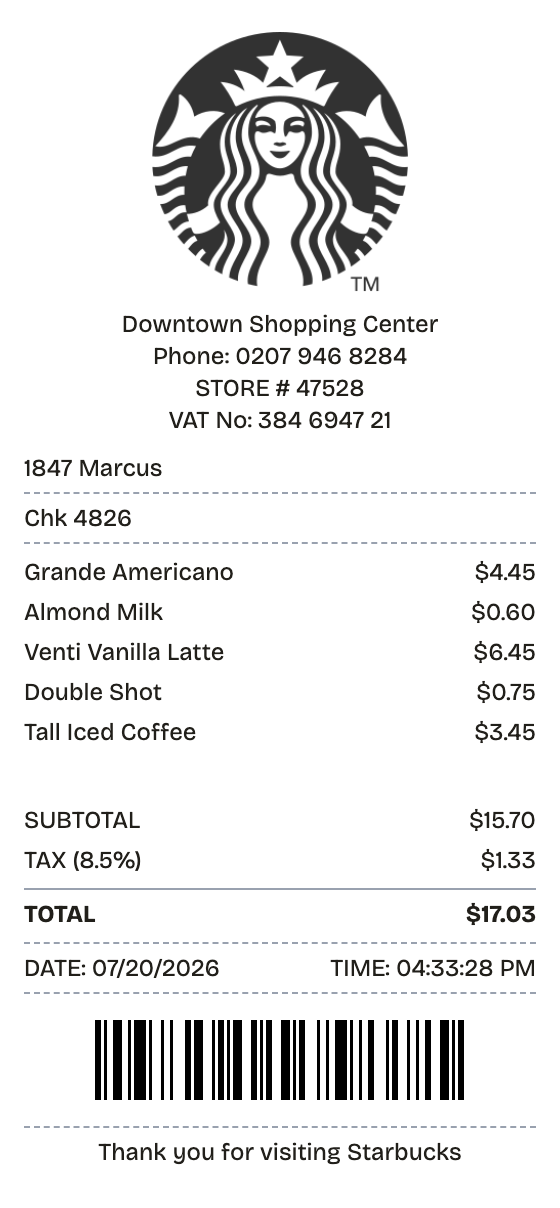
Features
What This Starbucks Receipt Template Gets Right
The columns align, the totals add up, and the type matches a register — automatically.
Priced Modifier Lines
Indented rows for almond milk, extra shots, and syrups price out under each drink.
Check and Name Lines
A customer name and check number print above the order, the way the register does it.
Store Header
Store number, phone, and VAT line stack at the top — swap in any location you need.
Auto-Calculated Totals
Subtotal and tax recalculate the instant you add a drink or change a price.
Receipt Barcode
A Code 128 barcode renders near the footer, auto-generated or set to your own value.
Thermal-Style Output
Realistic receipt paper styling, downloadable as PNG, PDF, or JPEG.
How it works
The Fast Route to a Starbucks Receipt
No account, no install, no learning curve
- 01
Open this layout
- 02
Type over the details
- 03
Take the file
Use cases
Jobs This Template Does
The scenarios this format handles best
Expense Reports
Document business expenses for company reimbursement
Tax Documentation
Keep organized records for tax filing and deductions
Client Invoicing
Create professional receipts for client billing
Proof of Purchase
Generate records for warranties and returns
Budget Tracking
Monitor spending with organized receipt records
Reimbursements
Submit clear expense documentation for refunds
FAQ
Before You Ask
The short version of everything starbucks receipt related
Is ReceiptPronto free to use?
Yes. You can build and customize receipts for free with no sign-up required. Watermark-free exports and saved receipts are available with Pro.
Is it legal to make a fake receipt?
Yes, when "fake" means a mockup: recreating your own lost purchase records, building props for film or design work, or generating test data. Using a generated receipt to deceive a business, employer, or agency is fraud and is prohibited under our Acceptable Use Policy.
Related
Other Receipts Worth a Look
McDonald's Receipt
Fast food receipt with a bold order number, survey code, and card payment block

Restaurant Receipt
Dinner check with menu items, tax, tip guide, and signature line

Fast Food Receipt
Counter-service receipt with combo items and order number

Convenience Store Receipt
Corner store receipt with itemized purchases, tax, and barcode

Pharmacy Receipt
Prescription receipt with Rx numbers, copay, and insurance lines