
Receipt Template
Fake McDonald's Receipt Generator
Build a McDonald's receipt with a bold order number, survey code, menu items, and card payment block. Totals stay accurate; export PNG, PDF, or JPEG.
Build This McDonald's Receipt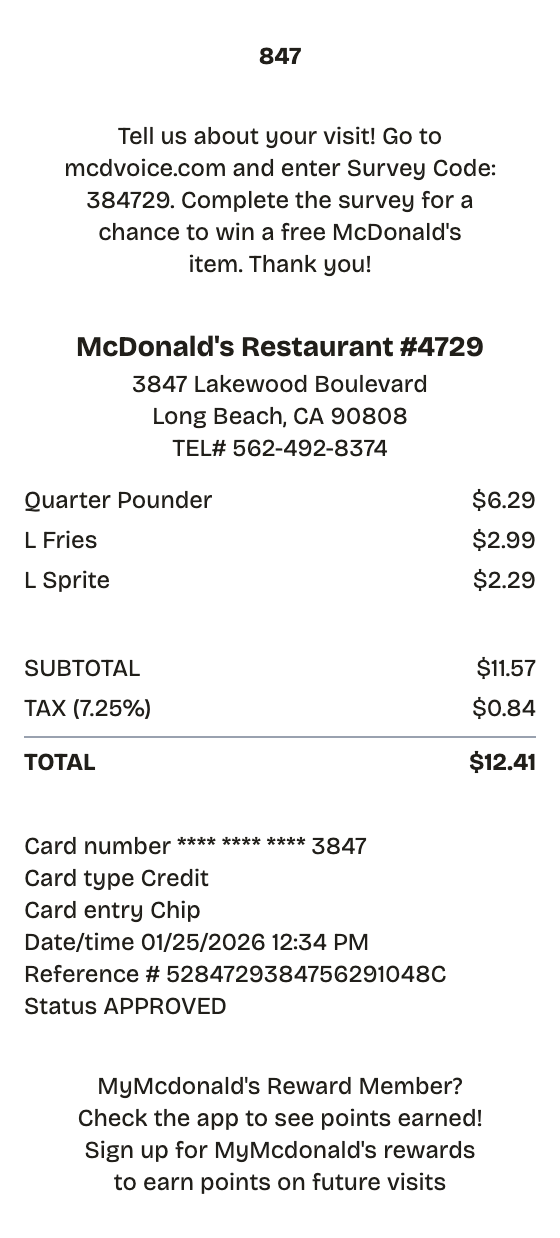
Features
Why This McDonald's Receipt Reads as Real
Built for people in a hurry: no design tools, no signup, nothing to install.
Bold Order Number
The oversized three-digit order number tops the tape, first thing on a real McDonald's slip.
Survey Code Block
The mcdvoice.com feedback message with its numeric survey code — both lines fully editable.
Editable Menu Items
Swap the Quarter Pounder, fries, and drink for any order; totals recalculate on their own.
Restaurant Header
Restaurant number, street address, and TEL# line sit mid-receipt, where they actually print.
Card Payment Detail
Card type, entry mode, reference number, and approval status in an aligned payment block.
Fast Export
Finish and download as PNG, PDF, or JPEG in about a minute.
How it works
Your McDonald's Receipt in Three Moves
Open, edit, download — that is the entire process
- 01
Pick this format
- 02
Edit against the live preview
- 03
Keep the result
Use cases
Everyday Reasons to Make a McDonald's Receipt
A few of the jobs people bring it
Expense Reports
Document business expenses for company reimbursement
Tax Documentation
Keep organized records for tax filing and deductions
Client Invoicing
Create professional receipts for client billing
Proof of Purchase
Generate records for warranties and returns
Budget Tracking
Monitor spending with organized receipt records
Reimbursements
Submit clear expense documentation for refunds
FAQ
What People Want to Know
What to know before building your mcdonald's receipt
Is ReceiptPronto free to use?
Yes. You can build and customize receipts for free with no sign-up required. Watermark-free exports and saved receipts are available with Pro.
Is it legal to make a fake receipt?
Yes, when "fake" means a mockup: recreating your own lost purchase records, building props for film or design work, or generating test data. Using a generated receipt to deceive a business, employer, or agency is fraud and is prohibited under our Acceptable Use Policy.
Related
Nearby Formats

Fast Food Receipt
Counter-service receipt with combo items and order number

Starbucks Receipt
Coffee shop receipt with priced drink modifiers, check number, and barcode

Convenience Store Receipt
Corner store receipt with itemized purchases, tax, and barcode

Pharmacy Receipt
Prescription receipt with Rx numbers, copay, and insurance lines
Auto Service Receipt
Mechanic-style receipt covering services, parts, labor, and vehicle details