
Receipt Template
Fake Pharmacy Receipt Generator
Make a pharmacy receipt with Rx numbers, prescriber, and copay lines in about a minute. Totals calculate live; export a realistic thermal print as PNG or PDF.
Build This Pharmacy Receipt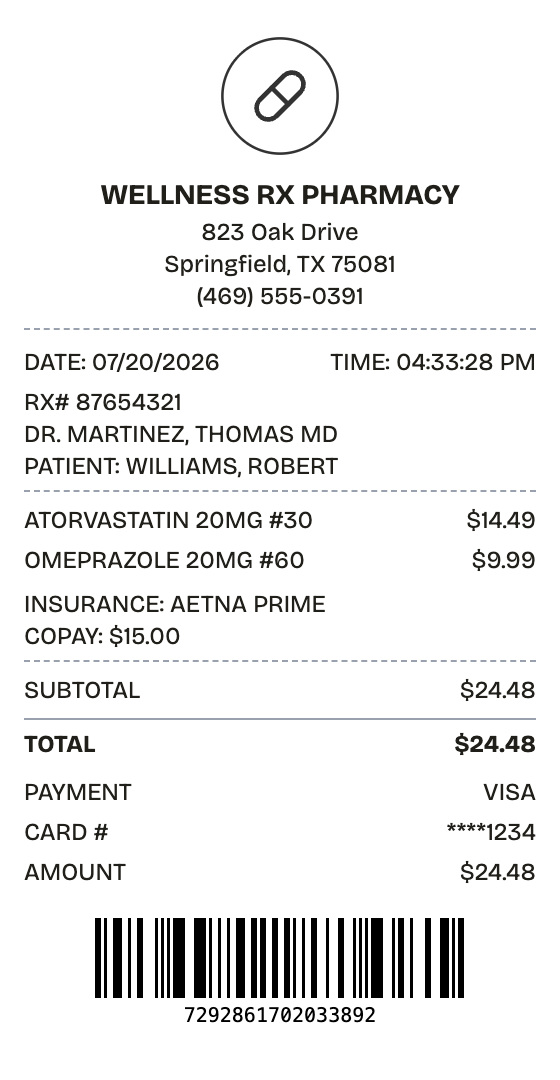
Features
A Pharmacy Receipt With the Details Handled
Everything on the receipt is a field you can change, from the logo down to the barcode digits.
Drag & Drop Builder
Order the sections the way your receipt needs them — Rx details up top, insurance lines before the total, barcode at the end.
Real-time Preview
Add a medication or change a copay line and the preview redraws instantly. No guessing what the export will look like.
Multiple Export Formats
Download as PDF for claim paperwork, or PNG and JPEG when an image is easier to file or send.
Custom Styling
Set the pharmacy name, Rx numbers, and patient lines so the layout reads like a real prescription printout.
Barcode & QR Support
Attach a Code128 barcode in an Rx-number format, or a QR code, with values you control.
Paper Styles
Thermal output matches what pharmacy registers actually print; white paper suits formal documentation.
How it works
Your Pharmacy Receipt in Three Moves
Open, edit, download — that is the entire process
- 01
Pick this format
- 02
Edit against the live preview
- 03
Keep the result
Use cases
Everyday Reasons to Make a Pharmacy Receipt
A few of the jobs people bring it
HSA/FSA Claims
File pharmacy purchases against health savings or flexible spending accounts
Medical Tax Deductions
Hold itemized prescription records for medical expense deductions
Insurance Claims
Back up reimbursement requests with a proper prescription receipt
Medication Tracking
Log what each fill cost, month over month
Employee Benefits
Document pharmacy spending for employer health programs
Pharmacy Training
Show pharmacy technicians what a correct register printout contains
FAQ
What People Want to Know
What to know before building your pharmacy receipt
What details does a pharmacy receipt include?
Pharmacy name, patient, Rx number, prescriber, medication with strength and quantity, insurance copay, and the amount paid. Every one of those fields is editable in this template.
Are prescription items taxed on receipts?
Prescriptions are exempt from sales tax in almost every US state, so this template ships with tax at 0%. Add tax only for OTC items in states that charge it.
Can I include insurance information?
Yes. The template includes a custom message block carrying the plan name and copay; edit it directly or add more blocks for coinsurance and deductible lines.
What is a pharmacy receipt?
A pharmacy receipt documents a prescription or over-the-counter purchase, and it carries more than a retail receipt does: the Rx number, prescriber, patient name, medication with strength and quantity, and the insurance copay. It works as proof of purchase and as a reference back to the prescription record.
When would you need a pharmacy receipt?
HSA and FSA administrators, insurers, and the IRS all expect pharmacy purchases documented properly, and the details must be right — an Rx number that doesn't line up with the copay math undermines the whole record. A well-built pharmacy receipt covers reimbursement claims, medical expense deductions, and long-term medication cost tracking.
Which fields matter most on a pharmacy receipt?
Pharmacy name, address, and phone • Patient name and Rx number • Prescriber name, plus DEA number where shown • Medication, strength, quantity, and NDC code • Insurance plan and the copay or coinsurance charged • Fill date and refills remaining • Amount paid and how it was paid
How to make your pharmacy receipt look right
Keep the tax at 0% — prescriptions are tax-exempt in nearly every state • Format the Rx line the way pharmacies print it: RX# followed by seven or eight digits • Put insurance plan and copay in a custom message block between the items and the total • Give the barcode a value that could pass for an Rx number — a random string reads as fake
Is ReceiptPronto free to use?
Yes. You can build and customize receipts for free with no sign-up required. Watermark-free exports and saved receipts are available with Pro.
Is it legal to make a fake receipt?
Yes, when "fake" means a mockup: recreating your own lost purchase records, building props for film or design work, or generating test data. Using a generated receipt to deceive a business, employer, or agency is fraud and is prohibited under our Acceptable Use Policy.
Related
Nearby Formats

CVS Receipt
Drugstore receipt with rewards balance, coupon box, and full transaction codes

Walgreens Receipt
Drugstore receipt with manager header, register codes, and product serial line
Medical Receipt
Clinic receipt with CPT codes and insurance breakdown

Grocery Receipt
Supermarket register tape with items, savings, and loyalty points

Convenience Store Receipt
Corner store receipt with itemized purchases, tax, and barcode