
Receipt Template
Fake Cash App Receipt Generator
Build a Cash App receipt with $cashtags, a payment note, transaction ID, and funding source. Every field is editable; export as PNG, JPG, or PDF in a minute.
Build This Cash App Receipt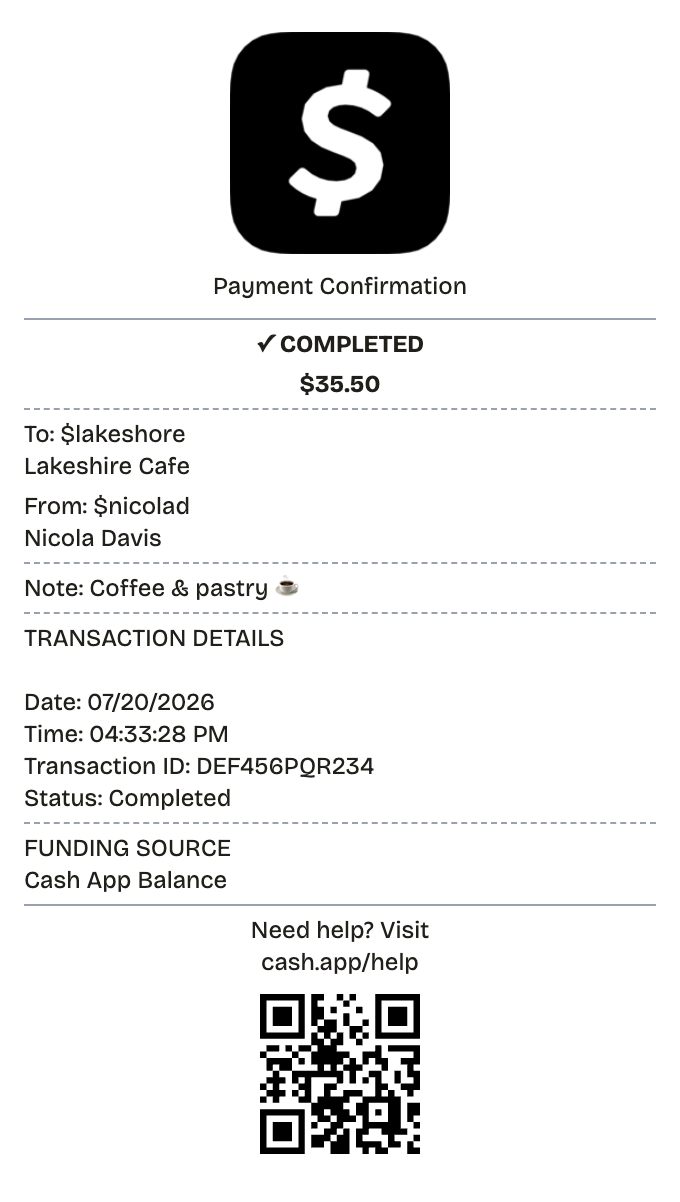
Features
What This Cash App Receipt Template Gets Right
Built for people in a hurry: no design tools, no signup, nothing to install.
$Cashtags Both Ways
Set sender and recipient handles exactly as Cash App displays them.
Status Line
Mark the payment completed, pending, or failed and the receipt reads accordingly.
Payment Note
Attach the short "for" line real transfers carry — coffee, rent, an invoice number.
Funding Source
Note whether the money drew from the Cash balance, a card, or a linked bank.
Minimal Layout
Amount up top, details below — the same spare structure the app uses.
Transaction Reference
Add the identifier that lets a payment be looked up later.
How it works
Your Cash App Receipt in Three Moves
Open, edit, download — that is the entire process
- 01
Pick this format
- 02
Edit against the live preview
- 03
Keep the result
Anatomy
Reading a Cash App Receipt, Line by Line
Each part of the cash app receipt and the job it does.
- Amount
- Big number, top of the screen. Everything else on a Cash App confirmation hangs under it.
- $Cashtag and name
- Display name plus the unique $handle. Payments route by $cashtag, so it identifies who got paid.
- Payment note
- The one-line memo on the transfer — "lunch," "rent," an order number. Business accounts use it to describe what was sold.
- Date, time, and status
- The timestamp plus completed, pending, or refunded — the fields that establish the payment actually settled.
- Funding source
- Cash balance, linked debit card, or bank account — whichever the payment drew on.
- Transaction identifier
- The lookup reference, mirrored by a per-payment cash.app web link. Support traces transfers with it.
Use cases
Everyday Reasons to Make a Cash App Receipt
A few of the jobs people bring it
Business Income
Record each customer payment that arrives by $cashtag
Transfer Proof
Show money was actually sent for a purchase or service
Tax Prep
Split business receipts from personal transfers before filing
Money Between Friends
Log who paid whom and for what
Refund Documentation
Capture refunded transfers with their status shown
App Mockups
Produce believable P2P payment screens for design work
FAQ
What People Want to Know
What to know before building your cash app receipt
What does a Cash App receipt show?
Amount, timestamp, the counterparty's name and $cashtag, the note, the funding source, and a transaction reference — every one of them editable in this template.
Does Cash App keep receipts?
Each payment gets an in-app confirmation plus its own cash.app web receipt. When people need a printable or shareable version, they rebuild it clean — which is what this tool is for.
Are Cash App receipts valid business records?
Yes. Per-payment records make bookkeeping and 1099-K season manageable when customers pay by $cashtag. Document real payments or make mockups; never fabricate a transfer.
What exactly is a cash app receipt?
When money moves on Cash App, the app records a confirmation: the amount, the timestamp, each side's display name and $cashtag, the note attached to the payment, and a reference ID. Each transaction also gets its own web receipt at a unique cash.app URL.
Why would you recreate a cash app receipt?
Transfers on Cash App land instantly, and the confirmation is usually the only paper trail. That record matters when a customer pays a small business by $cashtag, when income needs reconciling at tax time, or when anyone has to show a transfer actually went through.
What information goes on a cash app receipt?
Payment amount • When the money moved • The other party's name and $cashtag • The note attached to the payment • Reference ID or cash.app receipt link • Where the money came from: balance, card, or bank • Whether it completed, is pending, or was refunded
Getting the details right on your cash app receipt
Every Cash App user has a $cashtag — leave it out and the receipt reads wrong • Real transfers almost always carry a note; give yours one • A funding source line rounds out the record • Keep it spare with green accents; Cash App confirmations are minimal by design
Is ReceiptPronto free to use?
Yes. You can build and customize receipts for free with no sign-up required. Watermark-free exports and saved receipts are available with Pro.
Is it legal to make a fake receipt?
Yes, when "fake" means a mockup: recreating your own lost purchase records, building props for film or design work, or generating test data. Using a generated receipt to deceive a business, employer, or agency is fraud and is prohibited under our Acceptable Use Policy.
Related
Nearby Formats
PayPal Receipt
PayPal-style payment confirmation with a 17-character transaction ID, sender and recipient, fee line, and funding source.
Cash Receipt
Signed cash payment receipt for payer and payee

Convenience Store Receipt
Corner store receipt with itemized purchases, tax, and barcode

Pharmacy Receipt
Prescription receipt with Rx numbers, copay, and insurance lines
Auto Service Receipt
Mechanic-style receipt covering services, parts, labor, and vehicle details