
Receipt Template
Fake Medical Receipt Generator
Build a medical receipt with CPT procedure codes, insurance adjustments, and patient responsibility. Every field is editable; export as PDF, PNG, or JPEG.
Edit This Medical Receipt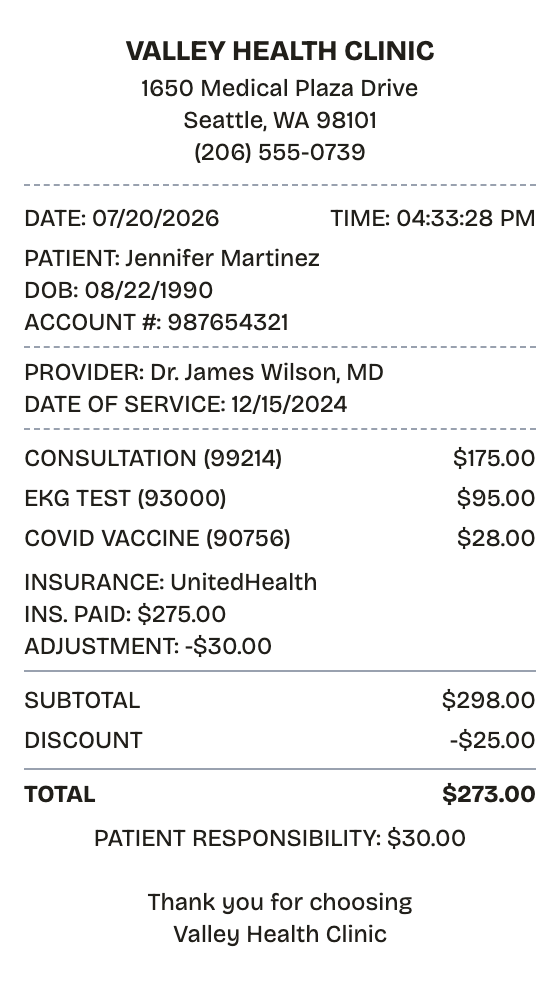
Features
Why This Medical Receipt Reads as Real
Built for people in a hurry: no design tools, no signup, nothing to install.
Billing-Statement Layout
Patient info, CPT-coded services, insurance adjustments, and patient responsibility, structured like a clinic statement.
Live Preview
Charges, adjustments, and the balance update the moment you type them.
PDF, PNG, and JPEG Export
PDF for HSA claims and records, PNG or JPEG for quick submissions.
Editable Provider Details
Clinic name, provider, patient account, procedure codes — change any of it.
Barcode and QR Codes
Add a patient ID barcode or a QR code to a portal when the document calls for one.
White or Thermal Paper
White reads as an official medical document; thermal covers front-desk checkout receipts.
How it works
Building a Medical Receipt Takes About a Minute
Most people finish their first receipt inside two minutes
- 01
Load the format
- 02
Swap in your purchase
- 03
Download and done
Use cases
Who Reaches for a Medical Receipt
From lost paperwork to prop-making, the usual suspects
HSA/FSA Claims
Provide the documentation that savings-account administrators require
Schedule A Deductions
Track out-of-pocket care costs toward the medical deduction threshold
Claim Filing
Support insurance claims and appeals with itemized service records
Employer Benefits
Run care expenses through workplace health reimbursement programs
Expense Tracking
Keep a running record of what each visit actually cost
Injury Claims
Document treatment costs for injury or workers' comp cases
FAQ
The Medical Receipt, Answered
Answers to the questions that come up most
What does a medical receipt show?
Provider and patient identification, the service date, CPT-coded services with their charges, insurance payments and adjustments, and the amount the patient paid or still owes.
Will this work for HSA or FSA claims?
Yes — administrators ask for provider name, date of service, a description of the service, and the amount paid. All four have a place on this template.
Where does insurance information go?
In a custom message section: insurer name, what the plan paid, and any adjustment. You can also contrast billed versus allowed amounts there.
What does a medical receipt show?
A medical receipt records care delivered and money paid at a clinic, practice, or hospital. It lists the patient, the provider, each service with its CPT code, the date of service, what insurance paid or adjusted, and what the patient owed or paid. One document doubles as a billing statement and proof of payment.
Why do you need a medical receipt?
HSA and FSA administrators won't reimburse without documentation naming the provider, service, date, and amount — a medical receipt is exactly that. Receipts also support Schedule A medical deductions, insurance claim filing and appeals, and simple verification that your insurer processed a visit correctly.
What are the key fields on a medical receipt?
Provider name, address, and NPI • Patient name, DOB, and account number • Service date and CPT codes • Each service with its charge • Insurance payments and adjustments • Copay, coinsurance, patient responsibility • Amount paid and payment method
How to make your medical receipt look right
Pair each service with its CPT code, as on the template's consultation and EKG lines • Carry insurer name, insurance paid, and adjustment amounts in a custom message section • Keep provider charges and insurance adjustments visually separate so the balance is easy to follow • Print on white paper — medical statements are rarely thermal
Is ReceiptPronto free to use?
Yes. You can build and customize receipts for free with no sign-up required. Watermark-free exports and saved receipts are available with Pro.
Is it legal to make a fake receipt?
Yes, when "fake" means a mockup: recreating your own lost purchase records, building props for film or design work, or generating test data. Using a generated receipt to deceive a business, employer, or agency is fraud and is prohibited under our Acceptable Use Policy.
Related
If This Is Close but Not Quite

Pharmacy Receipt
Prescription receipt with Rx numbers, copay, and insurance lines

CVS Receipt
Drugstore receipt with rewards balance, coupon box, and full transaction codes

Walgreens Receipt
Drugstore receipt with manager header, register codes, and product serial line
Expense Receipt
Expense receipt with employee, category, and approval fields

Convenience Store Receipt
Corner store receipt with itemized purchases, tax, and barcode