
Receipt Template
Fake Taxi Receipt Generator
Build a taxi receipt with fare breakdown, pickup and dropoff, distance, and tip in about a minute. Totals calculate live; export as PNG, PDF, or JPEG.
Open the Taxi Receipt Builder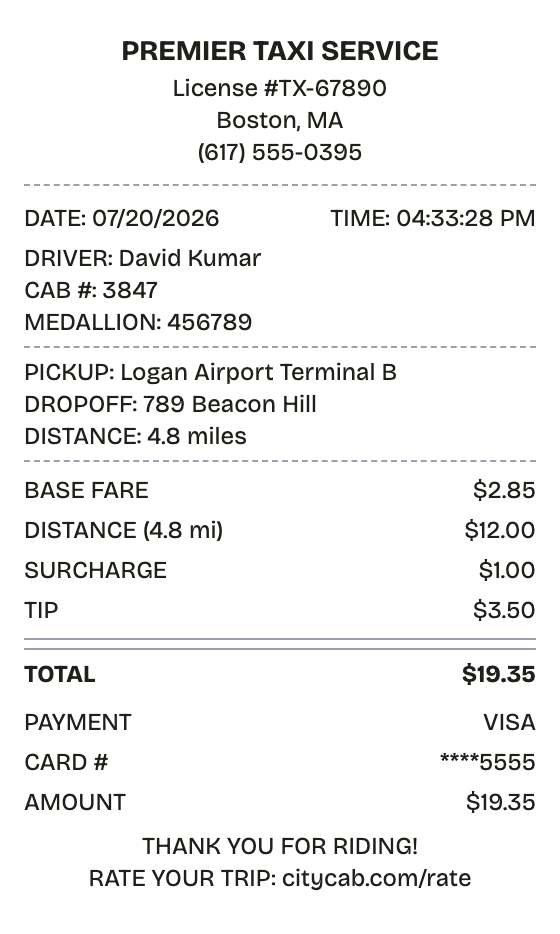
Features
Why This Taxi Receipt Reads as Real
Everything on the receipt is a field you can change, from the logo down to the barcode digits.
Itemized Fare Lines
Base fare, distance, surcharge, and tip each get their own line, laid out the way a metered cab prints them.
Live Total
The total recalculates the moment you change any fare component. No math, no mistakes.
PNG, PDF, and JPEG Export
PDF for the expense report, PNG or JPEG when you just need an image to attach.
Driver and Cab Details
Fields for company name, driver, cab number, and medallion — the details a real taxi receipt carries.
Barcode and QR Codes
Drop in a Code128 barcode or QR code when the receipt needs a scannable trip reference.
Thermal or White Paper
Thermal styling matches what a cab printer produces; white keeps it clean for filing.
How it works
The Fast Route to a Taxi Receipt
No account, no install, no learning curve
- 01
Open this layout
- 02
Type over the details
- 03
Take the file
Use cases
Jobs This Template Does
The scenarios this format handles best
Expense Reports
Attach itemized cab fares to corporate reimbursement claims
Airport Runs
Keep a record of fares to and from the airport on work trips
Tax Records
Back up self-employed transportation deductions with ride receipts
Taxi Fleets
Issue trip receipts for dispatch, driver, and fleet records
Billable Travel
Log rides to client sites for pass-through billing
App Mockups
Mock up realistic ride receipts for taxi or rideshare app designs
FAQ
Before You Ask
The short version of everything taxi receipt related
How do I break down the fare on a taxi receipt?
Give each charge its own line — base fare, distance, wait time, tolls, surcharge — and the totals section sums them automatically.
Can the receipt show pickup and dropoff locations?
Yes. Drop a custom message section anywhere on the receipt with the pickup address, dropoff address, distance, and duration.
Does the tip belong on the receipt?
Add it as its own line item. Expense policies usually reimburse the full amount including gratuity, so the tip needs to show up in the total.
What does a taxi receipt show?
A taxi receipt documents a metered cab or hired-car trip: who drove, where the ride started and ended, how far it went, and what each fare component cost. Expect the cab company name, driver and medallion numbers, pickup and dropoff points, base fare, distance charge, surcharges, tip, total, and payment method.
Why would you recreate a taxi receipt?
Expense desks want an itemized cab receipt before they reimburse a ride, and self-employed travelers need one to back up transportation deductions. A receipt also settles arguments — with a cab company over a fare, or with a card issuer over a charge you don't recognize.
What are the key fields on a taxi receipt?
Cab company name and contact number • Driver name plus medallion or license number • Pickup and dropoff locations • Miles traveled and ride duration • Base fare, distance charge, wait time, surcharges • Tip and final total • Payment method with date and time
Tips for creating your taxi receipt
Put pickup and dropoff addresses in a custom message block — expense reviewers look for them • List base fare, distance, and wait time as their own line items so the breakdown reads like a meter printout • Slot the driver name and cab number into a custom message near the top, as this template does • Leave tax at 0% — cab fares don't normally carry a separate sales tax line
Is ReceiptPronto free to use?
Yes. You can build and customize receipts for free with no sign-up required. Watermark-free exports and saved receipts are available with Pro.
Is it legal to make a fake receipt?
Yes, when "fake" means a mockup: recreating your own lost purchase records, building props for film or design work, or generating test data. Using a generated receipt to deceive a business, employer, or agency is fraud and is prohibited under our Acceptable Use Policy.
Related
Other Receipts Worth a Look

Uber Receipt
Uber-style ride receipt with fare breakdown, surcharges, payment card details, driver name, and pickup-to-dropoff route.
Car Rental Receipt
Rental receipt covering vehicle, dates, mileage, and fees

Airline Receipt
E-ticket style receipt with flights, fare lines, and a QR code

Parking Receipt
Garage receipt with entry, exit, and duration

Convenience Store Receipt
Corner store receipt with itemized purchases, tax, and barcode