
Receipt Template
Fake Hotel Receipt Generator
Build a hotel receipt with nightly room charges, incidentals, occupancy tax, and guest details. Every field is editable and totals calculate live.
Get Your Hotel Receipt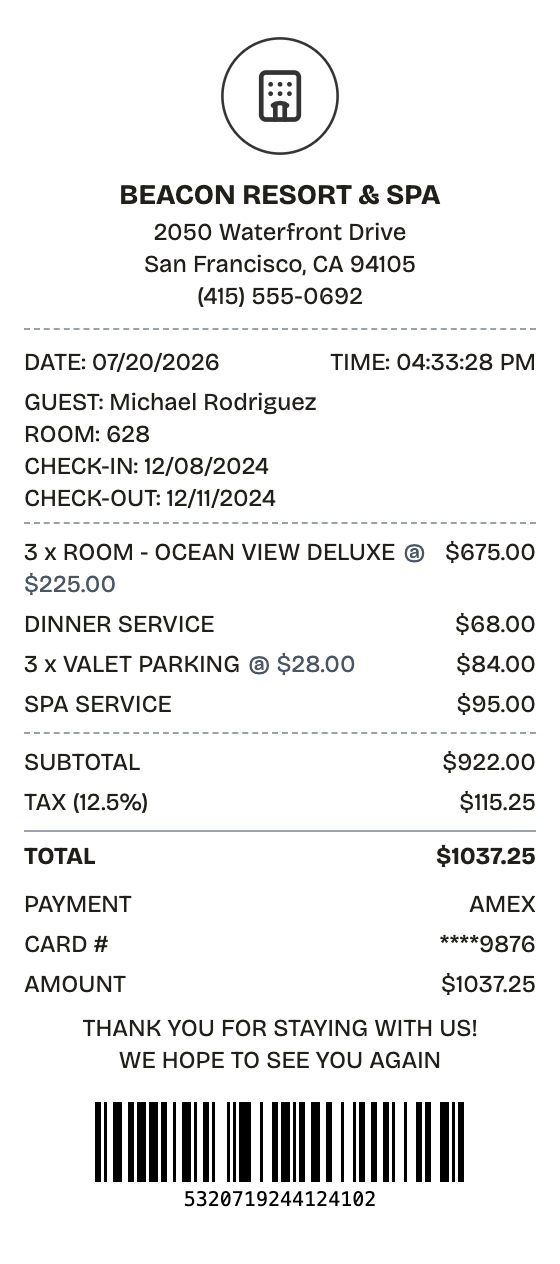
Features
Why This Hotel Receipt Reads as Real
Open the layout, type your details, and the hotel receipt comes out looking printed, not typed.
Drag & Drop Builder
Guest block, nightly room lines, incidentals, payment — sections drag into the same order a front-desk folio prints in.
Real-time Preview
Add a night or a spa charge and the subtotal, occupancy tax, and total update on the spot.
Multiple Export Formats
PDF for the expense report, PNG or JPEG when you just need an image. All three export in seconds.
Custom Styling
Hotel name, room number, check-in and check-out dates — every line on the folio is editable.
Barcode & QR Support
A confirmation barcode is built in; switch it to a QR code if the folio calls for one.
Paper Styles
White paper for a printed folio, thermal for a front-desk counter receipt.
How it works
From Blank Page to Hotel Receipt
The whole workflow, start to finish
- 01
Start here
- 02
Adjust what matters
- 03
Export it
Use cases
The Situations It Covers
Where this layout earns its keep
Expense Reports
Recreate a lost folio so a business stay can be reimbursed
Travel Tax Records
Keep itemized lodging documentation for deductible business trips
Front Desk Backup
Issue guest folios by hand when the property system goes down
Trip Archives
File a clean record of every stay if you travel often
Event Billing
Itemize room blocks and charges for conferences and offsites
Product Mockups
Drop realistic folios into booking-app and PMS design work
FAQ
Good Questions, Short Answers
The fine print, minus the fine print
What's the difference between a hotel folio and a hotel receipt?
Nothing meaningful — "folio" is just the hospitality term for the itemized checkout bill. This template produces exactly that: room charges by night, incidentals, tax, and the payment that settled it.
How do I show a multi-night stay?
Set the room line's quantity to the number of nights — the template ships with an ocean-view room at qty 3 for a 3-night stay. If the rate changed mid-stay, split it into one line per rate.
Can the receipt show occupancy tax and resort fees?
Yes. The tax rate field covers occupancy tax (the default is 12.5%), and resort or destination fees go in as ordinary line items so they appear itemized above the total. A custom message block handles any extra tax breakdown.
What does a hotel receipt show?
A hotel receipt — the folio handed over at checkout — itemizes everything billed to the room during a stay: the nightly rate, dining, valet or parking, spa charges, minibar, resort fees, and occupancy tax. It closes with the total and the card that settled it, and it is the document travelers keep as proof of what a stay actually cost.
Why do you need a hotel receipt?
A booking confirmation rarely satisfies a finance team — reimbursement usually requires the itemized folio. You may also need one for a travel deduction, a trip-insurance claim, or to contest a charge that hit your card after checkout. When the hotel's copy is lost or wrong, the details on the replacement have to be right; receipts are unforgiving.
What are the key fields on a hotel receipt?
Property name, address, and phone number • Guest name with check-in and check-out dates • Room type and the rate charged per night • Incidentals billed to the room — dining, valet, spa, minibar • Occupancy tax plus any resort or destination fees • Grand total with the payment method and card digits
How to make your hotel receipt look right
Put the guest name, room number, and stay dates in a custom message block right under the header • Use the quantity field as the night count — three nights of the same room is one line at qty 3 • Occupancy tax usually runs 10-15%; set the tax rate to match the city being billed • Enter resort or destination fees as their own line items so the folio itemizes cleanly
Is ReceiptPronto free to use?
Yes. You can build and customize receipts for free with no sign-up required. Watermark-free exports and saved receipts are available with Pro.
Is it legal to make a fake receipt?
Yes, when "fake" means a mockup: recreating your own lost purchase records, building props for film or design work, or generating test data. Using a generated receipt to deceive a business, employer, or agency is fraud and is prohibited under our Acceptable Use Policy.
Related
Keep Browsing

Convenience Store Receipt
Corner store receipt with itemized purchases, tax, and barcode

Pharmacy Receipt
Prescription receipt with Rx numbers, copay, and insurance lines
Auto Service Receipt
Mechanic-style receipt covering services, parts, labor, and vehicle details

Restaurant Receipt
Dinner check with menu items, tax, tip guide, and signature line
Service Receipt
Hourly service invoice with rates, line items, and net-30 terms