
Receipt Template
Fake Home Depot Receipt Generator
Build a Home Depot-style receipt with SKU item lines, store details, tax, and a return barcode. Totals update live; export as PNG, JPG, or PDF in a minute.
Open the Home Depot Receipt Builder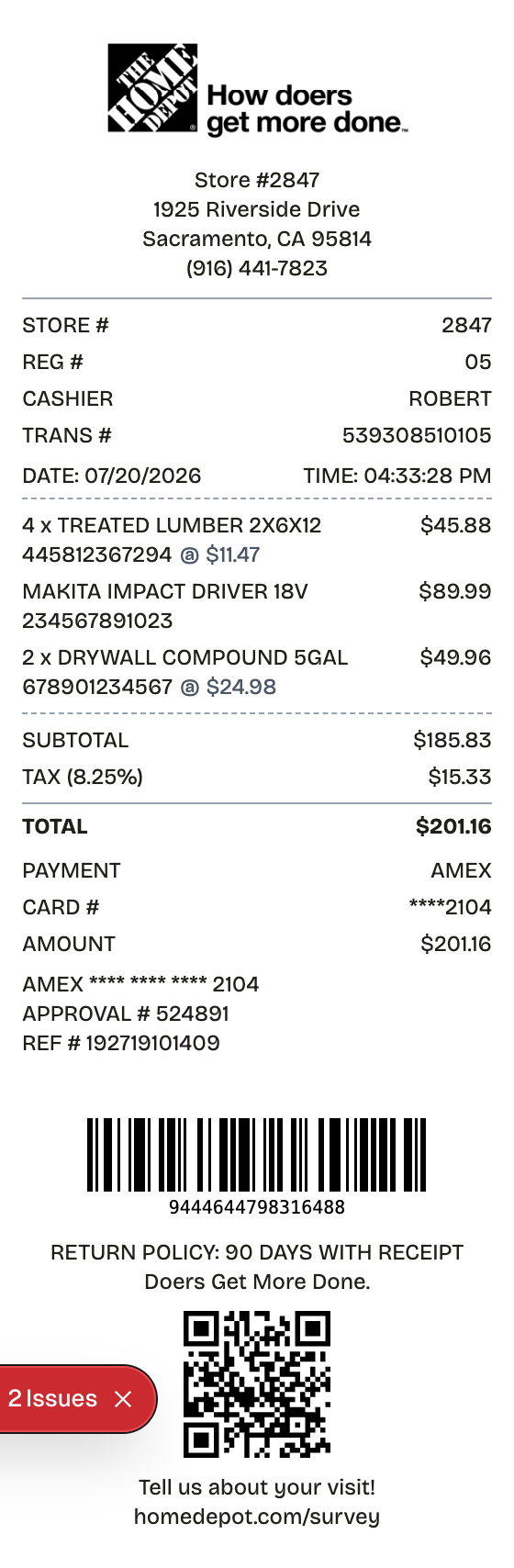
Features
One Minute From Blank to Home Depot Receipt
Everything on the receipt is a field you can change, from the logo down to the barcode digits.
SKU Item Lines
Long SKU numbers ride alongside each item, the signature of a Home Depot slip.
Store Block
Store number, street address, and phone print in the header, all editable.
Built for Job Costing
Quantities, unit prices, and live-calculating totals make materials lists easy to document.
Card and Cash Tender
Show credit, debit, or Pro-account style payment lines with approval codes.
Return Policy Line
The 90-day policy notice and survey invite sit at the foot, where the store prints them.
Two Barcodes
A Code128 return barcode plus a survey QR code, matching the real printout.
How it works
The Fast Route to a Home Depot Receipt
No account, no install, no learning curve
- 01
Open this layout
- 02
Type over the details
- 03
Take the file
Anatomy
Every Field on a Home Depot Receipt, Explained
Know these fields and your home depot receipt will hold up to a close read.
- Store header
- The wordmark and slogan above the store number, street address, and phone.
- Register line
- Cashier name or number, the register, and a transaction ID tied to this specific sale.
- Item lines
- Department and SKU digits, a description, and the price - with quantity and per-unit pricing on multi-item lines.
- Totals block
- Subtotal, then tax, then the amount paid.
- Payment details
- Card brand and last four, or cash tendered, with an approval code on card sales.
- Return policy and barcode
- The policy notice plus the bottom barcode the store scans to retrieve the sale - often without the original card.
Use cases
Jobs This Template Does
The scenarios this format handles best
Client Billing
Tie materials to a job so client invoices hold up
Job Costing
Run totals on supplies and materials across the life of a project
Return Backup
Keep the barcode handy in case materials go back
Warranty & Rebate Proof
File proof of purchase for tool warranties and manufacturer rebates
Expense Documentation
Substantiate hardware and supply spending for reimbursement
Prop & Mockup Work
Produce a realistic hardware slip for design or training use
FAQ
Before You Ask
The short version of everything home depot receipt related
What does the bottom barcode on a Home Depot receipt do?
It encodes the transaction. The returns desk scans it to retrieve the purchase, frequently without needing the original payment card, which makes it the receipt's most important element.
What information is on a Home Depot receipt?
The store number and address, date and time, register and cashier, SKU-coded item lines with prices, the totals, the tender, a return-policy line, and the return barcode. Every field in this template is editable.
Do contractors use these for client billing?
Constantly. Itemized slips document materials per job, which is the backbone of accurate client invoices and clean project cost records.
What does a home depot receipt show?
The printed record of a purchase at The Home Depot. Item lines carry long SKU numbers next to descriptions and prices, the header names the store number and address, the register line names the cashier, and the bottom barcode is what the returns desk scans to find the transaction.
Why would you recreate a home depot receipt?
The returns desk can retrieve a purchase from the receipt barcode or the payment card, so the slip is the fast path to an exchange. It also anchors warranty and rebate claims, expense reports, and job records - contractors bill clients and cost projects off itemized Home Depot slips.
What information goes on a home depot receipt?
Store number, street address, and phone • Date, time, register, cashier, and the transaction ID • Item lines pairing each description with its long SKU and price • Subtotal, tax, and total • Tender type with the card last four • The printed return-policy line • The bottom barcode used for return lookups
Tips for creating your home depot receipt
The long SKU beside every item is the giveaway detail - leave it in • The return-policy line belongs near the foot of the slip • Keep the bottom barcode; it is what the returns desk actually scans • Give the register and cashier lines believable values, not round placeholders
Is ReceiptPronto free to use?
Yes. You can build and customize receipts for free with no sign-up required. Watermark-free exports and saved receipts are available with Pro.
Is it legal to make a fake receipt?
Yes, when "fake" means a mockup: recreating your own lost purchase records, building props for film or design work, or generating test data. Using a generated receipt to deceive a business, employer, or agency is fraud and is prohibited under our Acceptable Use Policy.
Related
Other Receipts Worth a Look

Hardware Store Receipt
Register-style hardware receipt with SKUs, cashier info, and a return policy

Walmart Receipt
Walmart-style register receipt with transaction codes, an EFT debit block, and dual barcodes. Every line is editable, including your own logo.
Sales Receipt
Itemized retail sales receipt with tax and card payment
Itemized Receipt
Line-by-line receipt with quantities, prices, and tax

Convenience Store Receipt
Corner store receipt with itemized purchases, tax, and barcode